Project Gallery

Advanced ESP32 Display Control for 400×300 Serial Displays
A comprehensive C++ library for seamless control of serial displays with multiple fonts, colors, and advanced features like mixed-font layouts and scrolling text.
Three font sizes with automatic row management: Small (8×16), Medium (14×28), Large (28×54)
8 predefined colors with custom foreground/background combinations
Combine different fonts on the same screen with automatic positioning
Horizontal scrolling on specific lines for notifications and alerts
Dedicated top and bottom areas for status information
Intuitive Arduino-style API with comprehensive error handling
#include "TextDisplay.h"

TextDisplay display;

void setup() {
    Serial.begin(9600);
    display.begin(Serial, Color::BLACK);

    display.printAt(0, 0, "Hello World!",
                   FontSize::LARGE,
                   Color::YELLOW, Color::BLUE);
}// Set font and colors
display.setFontSize(FontSize::MEDIUM);
display.setTextColor(Color::GREEN, Color::BLACK);
// Print text with auto-wrap
display.setCursor(2, 0);
display.print("This text will automatically wrap!");
// Enable scrolling
display.setScroll(15, "Scrolling message", true);
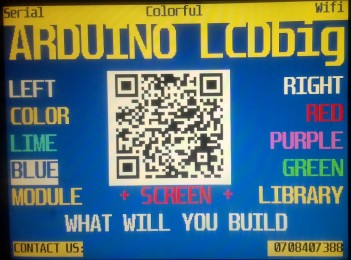
void playTutor() { //watch video above to see this part in action.
    delay(1000);
    display.setAlignment(Align::CENTER); //global print will be centred
    delay(1000);
    display.printAt(0, 0, "ARDUINO LCDbig", FontSize::LARGE, Color::YELLOW, Color::BLUE);
    delay(1000);
    delay(1000);
    display.setAlignment(Align::LEFT);
    display.printAt(4, 0, "LEFT", FontSize::MEDIUM, Color::WHITE, Color::BLUE);
    delay(1000);
    display.setAlignment(Align::RIGHT);
    display.printAt(4, 0, "RIGHT", FontSize::MEDIUM, Color::WHITE, Color::BLUE);
    delay(1000);
    display.setAlignment(Align::LEFT);
    display.printAt(6, 0, "COLOR", FontSize::MEDIUM, Color::YELLOW, Color::BLUE);
    delay(1000);
    display.setAlignment(Align::RIGHT);
    display.printAt(6, 0, "RED", FontSize::MEDIUM, Color::RED, Color::BLUE);
    delay(1000);

    display.setAlignment(Align::LEFT);
    display.printAt(8, 0, "LIME", FontSize::MEDIUM, Color::LIME, Color::BLUE);
    delay(1000);
    display.setAlignment(Align::RIGHT);
    display.printAt(8, 0, "PURPLE", FontSize::MEDIUM, Color::PURPLE, Color::BLUE);
    delay(1000);
    display.setAlignment(Align::LEFT);
    display.printAt(10, 0, "BLUE", FontSize::MEDIUM, Color::BLUE, Color::WHITE);
    delay(1000);
    display.setAlignment(Align::RIGHT);
    display.printAt(10, 0, "GREEN", FontSize::MEDIUM, Color::GREEN, Color::BLUE);
    delay(1000);
    display.setAlignment(Align::LEFT);
    display.printAt(12, 0, "MODULE", FontSize::MEDIUM, Color::YELLOW, Color::BLUE);
    delay(1000);
    display.setAlignment(Align::CENTER);
    display.printAt(12, 0, "+ SCREEN +", FontSize::MEDIUM, Color::RED, Color::BLUE);
    delay(1000);
    display.setAlignment(Align::RIGHT);
    display.printAt(12, 0, "LIBRARY", FontSize::MEDIUM, Color::YELLOW, Color::BLUE);
    delay(1000);
    display.setAlignment(Align::CENTER);
    display.printAt(14, 0, "WHAT WILL YOU BUILD", FontSize::MEDIUM, Color::WHITE, Color::BLUE);
    delay(1000);
    display.setBackgroundColor(Color::YELLOW);
    display.clearHead();
    display.printHeadNote("Serial", Align::LEFT,Color::BLUE, Color::NO_COLOR);
    delay(1000);
    display.printHeadNote("Wifi", Align::RIGHT,Color::BLUE, Color::NO_COLOR);
    delay(1000);
    display.printHeadNote("Colorful ", Align::CENTER,Color::BLUE, Color::NO_COLOR);
    delay(1000);
    display.printFootNote("CONTACT US: 0708407388", Align::MENU,Color::BLACK);
    delay(5000);
}